
Posts

Showing posts with the label Filter Data

Filtering np.array

Image
Exploring Different Ways to Filter np.array in Python Mastering np.array and Pandas in Python: A Comprehensive Guide Filtering in np.array: A Comprehensive Guide Filtering in np.array: A Comprehensive Guide Filtering is a common operation when we are dealing with data. In Python, the NumPy library, with its powerful n-dimensional array object, offers numerous ways to filter arrays. In this blog post, we will explore how we can filter np.array in Python. Importing the Library First things first, to use NumPy, we need to import it. We usually import it with an alias, np. import numpy as np Creating a NumPy Array Before we start filtering, let's create a simple NumPy array: arr = np.array([1, 2, 3, 4, 5]) This creates a one-dimensional array. Filtering Array with Conditions Let's say we wan...

CategoricalDtypes used in Filtering Data

Image
CategoricalDtypes in Pandas CategoricalDtypes can also be used for filtering.  For example, if we have low, high, and medium survey responses, we can use CategoricalDtypes to filter all responses less than or equal to medium. There are three basic steps! Create the CategoricalDtype. Apply the CategoricalDtype to the pandas Series. Filter the data. It is just that simple.  Let's look at an example. When we print the filtered_df, we can see we have our desired output.  It is just that simple! Link to Google Colab with the code!

DataFrame groupby agg style bar

Image
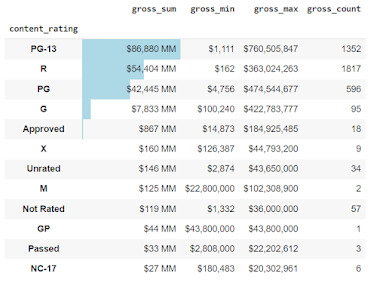
 The goal of the article is to investigate the bar function through the style method of Pandas DataFrame.  So, when we work with DataFrames, we can create a visual within a DataFrame.  What does that mean? We can embed bar charts, sparklines, and mini bar charts in the DataFrame.  This can reduce the amount of cognitive load when reviewing a DataFrame.   Google Colab link with all the code To get started, we are going to import the data: import pandas as pd import numpy as np import pandas_profiling as pp loc = 'https://raw.githubusercontent.com/aew5044/Python---Public/main/movie.csv' m = pd.read_csv(loc) pd.set_option('display.max_columns',None) pd.options.display.min_rows = 10 Next, I want to create a new DataFrame that groups by the rating (e.g., "R" "PG-13"), then calculates the total sum, min, max, and total observations for gross.  content = ( m .groupby('content_rating') .agg({'gross':['sum','min...

drop_duplicates DataFrame

Finding unduplicated lists is task number 1 on day 2, so enjoy this quick review on deduplicating a list based on a few paramaters. This narration discusses uses for drop_duplicates. Usually, drop_duplicates is not used in isolation. There are usually steps before the process. The movies DataFrame has a list of movies with director_name and gross. I first want all movies with a gross above 1 MM, and of those movies, the top-grossing moving by the director.  This is how I would approach the task with pandas and chaining.  First, Import the packages and data: Google Colab space with all the executable code import pandas as pd import numpy as np loc = r'C:\....movie.csv' m = pd.read_csv(loc) pd.set_option('display.max_columns',None) pd.options.display.min_rows = 10 Second, apply the desired steps.  At 1, filter out the unnecessary data.  At 2, sort the values by the director's name and gross amount for the movie.  At 3, drop the duplicates by the dire...

Filtering Data With Masking

Image
  Goal: Filter DataFrames Filtering data is required for every data analysis project.  The majority of blogs I see only detail how to filter the DataFrame by the row index. It is rare I need to filter on the row index and I don't want to reset the index for every filter. For example, we only want data in the DataFrame where the budget is over $10,000,000, and the director's name is James Cameron.  Well, that is a very specific example, but you get the idea.   There are two general steps (example on Google Colab ) Define the filters/mask Reference the mask(s) between []  I always made the filtering process more difficult than reality.  After looking, and looking, and looking for ways to filter data in pandas, I found a method that meets my expectations.  It must be easy to remember, discuss, and explain to non-programmers.  Also, if another person not all that familiar we Python, they can update the filters as needed, add new ones, and continu...